
A runtime error is an error that happens while a program is running. Not before it starts. Not while it is being installed. It usually shows up when the app, game, website, script, or software tries to do something and fails in the middle of the process.
You may see a message like “runtime error,” “Microsoft Visual C++ runtime error,” “RuntimeError,” or something more specific like a Python runtime error or C++ runtime error. The wording changes depending on the app and system. But the idea is mostly the same. The program started, then something went wrong while it was running.
This guide explains what a runtime error means, why it happens, common examples, and how to fix it. We’ll keep it simple. No heavy coding talk unless it helps.
Quick Answer: A runtime error means a program crashes or fails while it is already running. It can happen because of missing files, bad code, memory issues, outdated software, broken app data, missing Visual C++ files, browser problems, or system conflicts. Restart, update the app, reinstall needed components, and check recent changes first.
What Does Runtime Error Mean?
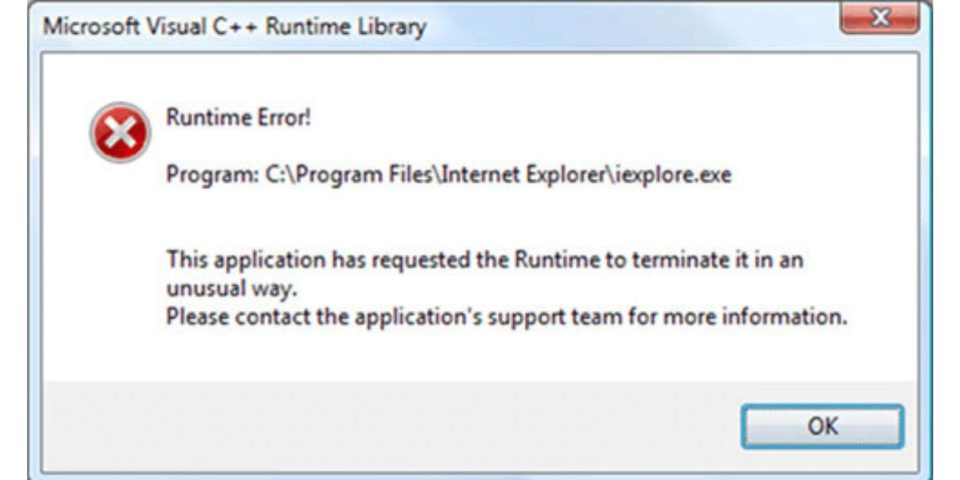
A runtime error means the program hit a problem during execution. In simple words, the app started fine but then failed when it tried to perform a task. That task could be opening a file, loading a game level, connecting to the internet, reading user input, using memory, or calling another system file.
This is different from an install error. It is also different from a compile error in programming. A compile error happens before code can run. A runtime error happens after the program has already started. Small difference, but it matters.
For normal users, runtime errors usually mean the app needs repair, update, reinstall, or missing system files. For developers, it means the code did something that failed while running. Both are runtime errors. Different angle.
Runtime Error vs Compile Error vs Syntax Error
These errors can sound similar, especially if you are learning programming or troubleshooting software. Here is a simple way to separate them.
| Error Type | When It Happens | Simple Meaning |
|---|---|---|
| Syntax error | Before the program runs | The code is written wrong |
| Compile error | While building the program | The code cannot be turned into a running program |
| Runtime error | While the program is running | The program started but failed during use |
| Logic error | Program runs but gives wrong result | The code works but the answer is wrong |
A runtime error is the one regular users usually see in apps, games, and software. Developers see it too, but they often get more technical details like line numbers, stack traces, or exception names.
Common Runtime Error Examples
Runtime errors can show up in many ways. Some are clear. Some are vague and annoying. The message may not always say what caused the issue.
Common examples include:
- Microsoft Visual C++ runtime error
- Runtime Error Program C:
- Python RuntimeError
- JavaScript runtime error
- C++ std::runtime_error
- App crashes after opening
- Game crashes while loading
- Website script stops working
- “This application has requested the Runtime to terminate it”
- Error after clicking a button inside an app
- Runtime error during login or file upload
- Runtime error after a recent update
The main clue is timing. If the software opens and then crashes during use, that points toward runtime behavior. If it never installs, that is usually not a runtime error.
What Causes a Runtime Error?
A runtime error happens when the program tries to do something it cannot complete. Maybe a file is missing. Maybe the app asks for memory it cannot use. Maybe the code receives bad input. Maybe the system component it needs is damaged or outdated.
Common causes include:
- Missing or damaged program files
- Outdated app or game version
- Missing Microsoft Visual C++ Redistributable
- Broken.NET Framework or Java files
- Low memory or system resources
- Corrupted cache or app data
- Bad browser extension
- Script error on a website
- Software conflict after an update
- Antivirus blocking part of the app
- Damaged Windows system files
- A bug inside the program itself
- Wrong input or unexpected data
- Network connection failure during app use
Sometimes the problem is on your device. Sometimes it is the app itself. And sometimes it is the server or website. That part can be annoying because the same runtime error message does not always tell you where the real issue is.
Is a Runtime Error Serious?
A runtime error is not always serious. If one app crashes once and works after restart, it may just be a small temporary issue. Yes, it happens. Apps are not perfect and sometimes they fail for no big reason.
But repeated runtime errors are different. If the same app crashes every time, or many apps start showing errors, then something needs attention. It may be corrupted app files, missing runtime components, Windows problems, low storage, or a system conflict.
| Situation | How Serious It May Be |
|---|---|
| One-time error in one app | Usually minor |
| Same app crashes every time | App repair or reinstall needed |
| Many apps show runtime errors | System component issue possible |
| Runtime error after update | Update conflict or missing files |
| Runtime error in browser only | Cache, extension, or script issue |
| Runtime error in code | Needs debugging |
So don’t panic. But don’t ignore it if it keeps coming back.
How to Fix a Runtime Error
There is no single fix for every runtime error. The right fix depends on where you see it. A Microsoft Visual C++ runtime error is not the same as a Python runtime error. A browser runtime error is not the same as a game crash.
Start with the simple fixes first. Restart the app, restart the computer, update the software, then repair or reinstall missing components. If the error started after a recent update, driver change, or new app install, that recent change matters a lot.
1. Restart the App and Your Device
Start simple. Close the app fully and open it again. If it still shows the runtime error, restart your computer or phone. This clears temporary memory issues, stuck background tasks, and small app glitches.
It sounds basic, but it works more often than people think. Some runtime errors happen because the app tried to use a file or process that was stuck. A restart gives the system a clean start.
If the error comes back right away after restart, move to the next fixes. That means it is probably not just a temporary glitch.
2. Update the App, Game, or Software

An outdated app can throw runtime errors because it no longer works well with your system, browser, drivers, or online service. This is common with games, older desktop apps, browser tools, and software that depends on online login.
Check for updates inside the app first. If the app does not open, go to the official website or app store and download the latest version. For games, use the game launcher’s repair or update option if it has one.
Don’t download random “fixed” versions from unknown websites. That can bring malware or broken files. Use the original source where possible.
3. Repair or Reinstall Microsoft Visual C++ Redistributable
Many Windows programs need Microsoft Visual C++ Redistributable files. If those files are missing or damaged, you may see a Microsoft Visual C++ runtime error. This is common with games, editing software, older apps, and some tools built with C++.
Go to Apps in Windows Settings and look for Microsoft Visual C++ Redistributable packages. You may see several versions. That is normal. Different programs need different versions.
You can try repairing them first:
- Open Settings.
- Go to Apps.
- Find Microsoft Visual C++ Redistributable.
- Choose Modify if available.
- Click Repair.
- Restart your PC.
If repair does not help, reinstall the needed Visual C++ Redistributable from Microsoft’s official source. Don’t remove every version unless you know what you’re doing. Some apps depend on older versions and removing them can create new errors.
4. Repair or Reinstall the Problem App
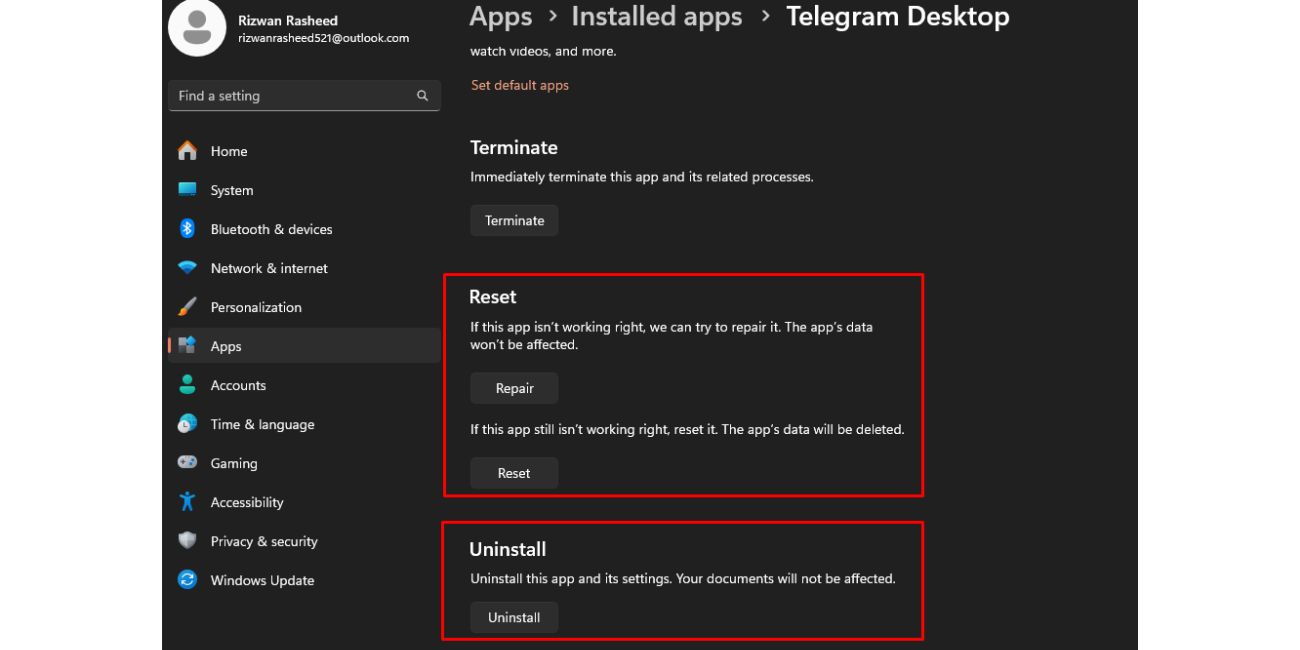
If only one app shows the runtime error, that app may be damaged. Its files may be missing, its cache may be broken, or an update may have installed badly. This is pretty common.
Try the app’s repair option if Windows offers one. Go to Settings, then Apps, choose the app, and look for Repair or Reset. Some apps also have a repair option in their installer. Game launchers often call it verify files, scan and repair, or check integrity.
If repair does not work, uninstall the app and install it again. Before uninstalling, back up saved projects, game saves, settings, or files if the app stores anything important. Small thing, but it saves trouble later.
5. Clear Cache and Temporary Files
Broken cache files can cause runtime errors. Apps and browsers store temporary files so they can load faster. Usually that helps. But if the cached data gets corrupted, the app may crash when it tries to read it.
For browsers, clear cache and cookies for the site that shows the error. For apps, look for a clear cache option in settings. You can also use Windows temporary file cleanup, but don’t randomly delete folders if you’re not sure what they are.
This fix is especially useful when:
- A website works in one browser but not another
- An app crashes after login
- A game crashes while loading saved data
- The error started after an update
- The app opens but fails on one screen
Cache errors can be weird. The app may look fine until it reaches the damaged file. Then it crashes.
6. Check for Windows Updates
Windows updates can fix system files, runtime components, security issues, and compatibility problems. If your system is missing updates, some apps may not work right. It is not always the cause, but it is worth checking.
Open Settings, go to Windows Update, and install available updates. Restart after updates finish. Don’t skip the restart because some components only apply after reboot.
If the runtime error started right after a Windows update, that is a different clue. In that case, the update may have caused a conflict. You can check update history and see if the timing matches.
7. Update Drivers If the Error Happens in Games or Graphics Apps
If the runtime error appears in a game, video editor, 3D tool, emulator, or graphics-heavy app, check your drivers. Graphics drivers matter a lot for apps that use GPU features. A bad or outdated driver can crash the program during loading or rendering.
Update your GPU driver from the official NVIDIA, AMD, Intel, or device maker website. For laptops, the laptop brand may provide safer driver versions. If the error started after a driver update, try rolling back to the previous version.
Also check audio, chipset, and storage drivers if the issue happens in a large game or professional app. Don’t use random driver updater tools. Honestly, they can make the problem worse.
8. Disable Conflicting Extensions or Add-ons

If the runtime error appears in a browser or web app, a browser extension may be the problem. Ad blockers, script blockers, password managers, VPN extensions, and privacy tools can sometimes break scripts on websites.
Try opening the site in a private window. If it works there, one extension or cached session may be causing the issue. You can also try another browser to compare.
Disable extensions one by one and test again. Don’t turn everything off forever. Just find the one causing the problem. If a website only fails with one extension enabled, that is your clue.
9. Check Antivirus or Security Software
Security software can sometimes block files an app needs while it is running. This can create runtime errors, especially in games, development tools, installers, scripts, or apps that update themselves.
Check your antivirus history or protection log. Look for blocked files linked to the app. If you trust the app and downloaded it from an official source, you can allow it through the security tool or add it to exclusions.
Be careful here. Don’t allow unknown files just because they annoy you. If the app came from a suspicious source, scan it first or replace it with a clean copy.
10. Reinstall.NET, Java, or Other Needed Runtime Components
Some programs need runtime environments like.NET, Java, Python, Node.js, or DirectX. If those components are missing or damaged, the app may open and then crash with a runtime error.
Look at the error message. It may mention.NET, Java, Python, DirectX, Visual C++, or another runtime. That clue matters. Reinstall or update the component from the official source.
Common examples:
| Error Clue | What to Check |
|---|---|
| Visual C++ runtime error | Microsoft Visual C++ Redistributable |
| .NET runtime error | .NET Desktop Runtime or.NET Framework |
| Java runtime error | Java Runtime Environment |
| Python RuntimeError | Python version, package, or script issue |
| DirectX runtime error | DirectX files or GPU driver |
| Node runtime error | Node.js version or package issue |
Don’t install every runtime you find online. Install the one the app actually needs.
11. Run System File Repair on Windows
If several apps show runtime errors, the issue may be with Windows system files. In that case, repairing the system can help. This is more useful when errors happen across many programs, not just one app.
Open Command Prompt as administrator and run:
DISM /Online /Cleanup-Image /RestoreHealth
After that finishes, run:
sfc /scannow
Let each command finish before closing the window. Then restart your computer. If Windows finds and repairs damaged files, test the app again.
If the error still happens after system repair, focus back on the app, runtime component, or recent changes.
12. Check If the App Has a Known Bug
Sometimes the runtime error is not your fault. The app may have a bug. The server may be down. A new version may have broken something. This happens with games, online apps, browsers, plugins, and software updates.
Check the app’s official support page, community forum, update notes, or status page. If many users report the same runtime error after the same update, waiting for a patch may be the real fix.
This can be annoying because you want to fix it now. But if the bug is inside the app, reinstalling Windows or changing drivers may waste time. Look for patterns before doing heavy repairs.
13. Fix Runtime Errors in Code
If you are a developer or student, a runtime error means your code ran but failed during execution. The code may be written correctly enough to start, but something went wrong while it was working.
Common coding causes include:
- Dividing by zero
- Using a missing file
- Calling a variable that has no value
- Accessing a list item that does not exist
- Passing the wrong data type
- Running out of memory
- Calling an API that fails
- Missing package or dependency
- Bad user input
- Network request timeout
For example, in Python, a RuntimeError or other runtime exception may happen when the program hits a condition it cannot handle. In C++, std::runtime_error can be thrown when something fails while the program is running. In JavaScript, runtime errors often happen in the browser when a script tries to use something undefined.
The fix is to read the error message, check the line number, and reproduce the issue. Add input checks. Handle exceptions. Test the exact case that breaks the program. Yeah, debugging can be slow, but the error usually gives you a trail.
What Not to Do When You See a Runtime Error
A runtime error can make people try random fixes. Some are harmless. Some make things worse. Try not to panic-click through every repair tool you find online.
Avoid these mistakes:
- Do not download random DLL files from unknown sites
- Do not delete runtime folders manually
- Do not uninstall every Visual C++ version at once
- Do not disable antivirus forever
- Do not reinstall Windows before trying app-level fixes
- Do not ignore repeated errors across many apps
- Do not trust “one-click runtime fixer” tools from unknown websites
The big one is DLL downloads. If an app says a file is missing, get the correct runtime or reinstall the app. Don’t grab a random DLL from a random site and drop it into system folders. That can cause more trouble.
How to Prevent Runtime Errors
You can’t prevent every runtime error. Apps have bugs. Updates break things sometimes. Files get damaged. Still, a few habits can lower the chance of seeing these errors again.
Good habits help:
- Keep apps updated
- Install software from trusted sources
- Keep Windows updated
- Restart after major updates
- Keep enough free storage
- Avoid random driver updater tools
- Don’t delete program folders manually
- Keep Visual C++ and.NET components installed
- Back up important app files or projects
- Check app requirements before installing
- Remove browser extensions you don’t use
- Watch for errors after new updates or plugins
The main thing is simple. Keep the app, system, and required runtime components in good shape. That won’t stop every crash, but it removes a lot of common causes.
Frequently Asked Questions About Runtime Errors
What is a runtime error in simple words?
A runtime error is an error that happens while a program is already running. The app starts, then fails when it tries to do something. That could be opening a file, using memory, loading data, or running a script.
What causes runtime errors?
Runtime errors can be caused by missing files, outdated software, damaged app data, low memory, bad code, missing runtime components, browser extensions, security tools, or system conflicts. The exact cause depends on where the error appears.
How do I fix a runtime error?
Restart the app first, then restart your device. Update the app, repair or reinstall it, clear cache, reinstall needed runtime components like Visual C++ or.NET, and check recent changes. If many apps fail, run Windows system file repair.
Is a runtime error a virus?
A runtime error is not a virus by itself. It just means a program failed while running. Malware can cause app problems in some cases, but most runtime errors come from software bugs, missing files, damaged components, or conflicts.
What is a Microsoft Visual C++ runtime error?
A Microsoft Visual C++ runtime error happens when a program that depends on Visual C++ runtime files fails while running. Repairing or reinstalling the Microsoft Visual C++ Redistributable often helps, especially for games and older Windows apps.
What is a runtime error in Python?
A runtime error in Python happens while the script is running. The code may start fine, then fail because of bad input, missing files, wrong data types, memory issues, or an exception that was not handled.
What is a runtime error in JavaScript?
A JavaScript runtime error happens when a script fails while running in the browser or server environment. It may happen because a variable is undefined, a function is missing, a request fails, or a browser extension blocks part of the script.
What is the difference between runtime error and syntax error?
A syntax error means the code is written in a way the language cannot understand. It usually stops the program before it runs. A runtime error happens after the program starts and fails during use.
Can low memory cause runtime errors?
Yes, low memory can cause runtime errors. If the app cannot get enough memory to complete a task, it may freeze, crash, or show an error. This is more common with games, editing software, large files, and older systems.
Should I reinstall Windows to fix runtime errors?
Usually no. Reinstalling Windows should be a last resort. Try app updates, repair, reinstall, runtime components, driver updates, and system file repair first. If many apps fail and nothing works, then a deeper system reset may be considered.
Final Thoughts
A runtime error means something went wrong while a program was already running. It may be a small app glitch. It may be a missing runtime file. It may be a browser script issue, a game crash, or a coding problem. The message may look technical, but the first fixes are usually simple.
Start with the app. Restart it, update it, repair it, and clear its cache. Then check Visual C++,.NET, Java, drivers, Windows updates, and system files if needed. If the error appears in your own code, read the exact message and test the line where it fails.
Where are you seeing the runtime error: a Windows app, game, browser, or your own code?