
In the age of fast-paced social media, creators need powerful yet intuitive mobile video editors to keep up with the demands of platforms like Snapchat. Whether you’re crafting quick Stories or aiming to go viral with a Spotlight clip, having the right editing tool can drastically cut down production time and boost content quality. Creators around the world rely on a handful of highly-rated mobile apps to make this process seamless. These editors offer filters, trimming tools, effects, transitions, and export options optimized for vertical video content favored by Snapchat.
TLDR
When it comes to creating Snapchat Stories or Spotlight clips quickly, mobile video editors like Adobe Express, VN, InShot, and others give content creators the flexibility to edit on the go. These apps are popular for their ease of use, professional-grade features, and fast export capabilities. Whether you’re a casual user or a social media veteran, using one of these top 7 editors can simplify your workflow and enhance the overall viewing experience of your content.
1. Adobe Express
Best for: Cross-platform branding and quick templates
Formerly known as Adobe Spark, Adobe Express is a simplified alternative to Adobe Premiere for mobile users. Driven by Adobe’s powerful ecosystem, this app is perfect for those wanting highly polished visuals without the steep learning curve of professional tools.
- One-click resize for social platforms including Snapchat
- Dozens of templates tailored for Stories and mobile-friendly video
- Easy addition of text overlays, logos, and creative assets
Adobe Express is ideal for creators who produce branded content and need to maintain consistent design aesthetics across platforms, including Snapchat.
2. VN (VlogNow)
Best for: Advanced editing on mobile devices
VN is a rising favorite among influencers and vloggers due to its professional-level control packed into a mobile interface. It’s free and offers many features typically found in desktop software.
- Multi-track editing and curve speed control
- Supports keyframe animations
- Export options optimized for vertical video
VN stands out when you want creative precision without having to move your project to a computer. For fast, detailed edits perfect for Snapchat Stories or Spotlight clips, VN is a powerful companion.
3. InShot
Best for: Simplicity and quick fixes
InShot continues to dominate the mobile editing app market because of its intuitive interface and range of handy tools. It’s extremely popular for Instagram and TikTok, and it works just as well for Snapchat content.
- Adjust aspect ratios instantly (including 9:16 vertical)
- Add filters, background music, text, and emojis
- Great for trimming, merging, and speed control
Its light footprint and user friendliness make it a go-to for creators who need to format Stories quickly, without spending much time in post-production.
4. CapCut
Best for: TikTok cross-posters and fast special effects
Developed by Bytedance (TikTok’s parent company), CapCut excels in visual finesse through effects, transitions, and automated features. While primarily known in the TikTok space, it’s equally effective for Story-style content on Snapchat.
- One-tap effects and trendy transitions
- Speech-to-text for auto captions
- Stock sound effects and music included
CapCut is perfect for creators looking to level up their Snapchat clips with sound and motion graphics finesse. Its deep customization options help videos stand out in Spotlight.
Image not found in postmeta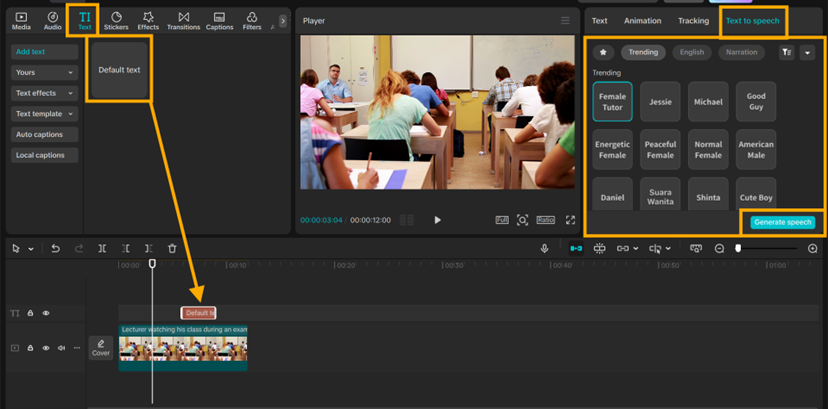
5. Splice
Best for: Music-centric videos with style
Splice by GoPro is famous for its smooth user interface and great audio syncing capabilities. Though originally meant for GoPro content, it’s now widely used by mobile creators due to its music editing finesse.
- Extensive music library and beat synchronization tools
- Custom overlays and storyboarding formats
- Cloud syncing between devices
Snapchat creators who rely on mood-setting music or voiceovers will appreciate Splice’s audio-forward workflow. Its fast render times are a bonus for daily Story uploads.
6. KineMaster
Best for: Multilayer video editing on mobile
KineMaster gives you a feature-rich editing environment without the need for desktop software. It’s a favorite among mid-level creators who desire more advanced editing tools on their phones.
- Multi-folder layer editing (video, image, text, overlays)
- Chroma key for green-screen effects
- Real-time recording and trimming
If you’re producing a short film stylized for Spotlight but want detailed carving of the scenes, KineMaster excels due to its timeline flexibility and animation tools.
7. Videoleap
Best for: Creativity and cinematic effects
Videoleap allows creators to inject high stylization into their Stories. With effects somewhat resembling Adobe After Effects—yet optimized for mobile—Videoleap distinguishes itself through its audio-video synchronization and artistic filter bank.
- Double exposure and advanced blending modes
- Layer-based editing system
- Library of ready-to-use visual effects
It’s ideal for Snapchat clips that aim for an immersive storytelling edge. For creators experimenting with short-form narrative visuals, Videoleap makes a compelling companion.
Final Thoughts
With mobile-first content booming across platforms like Snapchat, the choice of editor directly impacts how fast—and how well—you can create. Whether users want quick trims and filters or high-level multi-track editing, there’s an app on this list that caters to their workflow. Choosing the right mobile video editor can uplift the quality of your Snapchat Stories and set your Spotlight clips apart from the crowd.
FAQs
-
What’s the best mobile app for editing vertical video?
InShot and VN are both excellent for vertical video editing, especially for platforms like Snapchat, TikTok, and Instagram. -
Can I use these apps to edit videos outside of Snapchat?
Yes, all these apps support standard formats and can be used for Instagram Reels, TikTok, YouTube Shorts, and more. -
Are these apps free to use?
Most of them offer free versions with watermarks or limited features. Premium versions typically unlock advanced features and remove ads/watermarks. -
Is Adobe Express suitable for beginners?
Yes, Adobe Express offers guided templates and is very user-friendly, making it ideal for beginners who want polished results quickly. -
Which app is best for adding music to Snapchat videos?
Splice is highly regarded for music integration and beat-syncing, making it a favorite for music-focused content creators.