
You open a WiiLink channel on your Nintendo Wii, but the connection fails and the console shows Error Code 107305. The service cannot load and the online feature stops working.
This guide explains what the error means, why it appears, and how you can fix it so your Wii console can connect to WiiLink servers again.
What Is WiiLink Error Code 107305?
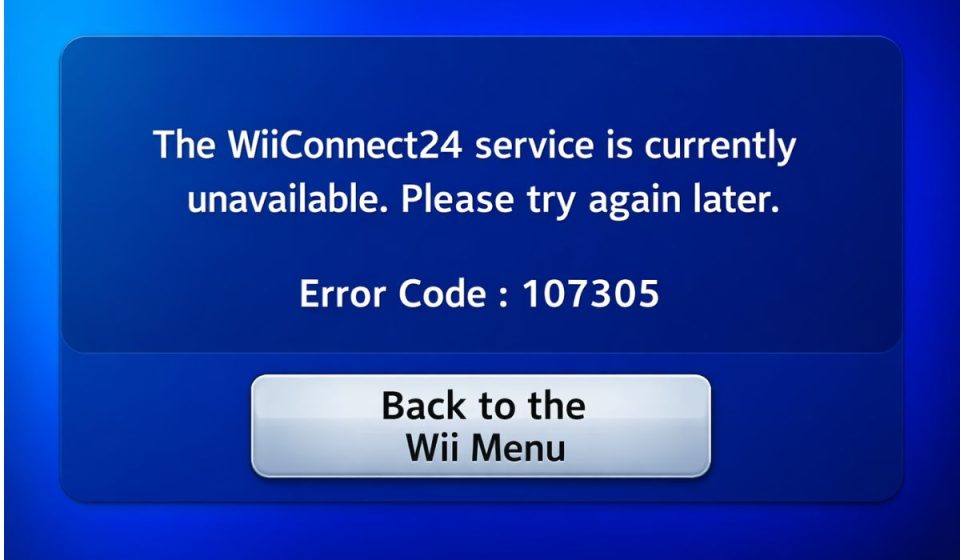
WiiLink Error Code 107305 appears when the Nintendo Wii console cannot establish a stable connection with WiiLink servers. WiiLink is a community project that restores online features for the Wii after Nintendo Wi-Fi Connection services were discontinued. The service allows players to access restored channels such as Wii Mail, Forecast Channel, News Channel, and other online features.
When the console launches a WiiLink channel, it sends a connection request through the Wii internet settings. If the request cannot reach the WiiLink server or the server cannot respond properly, the system shows error code 107305 and stops the connection attempt.
Players usually see this error when launching a WiiLink channel, running the Wii internet connection test, or attempting to load online content through the restored service.
Common Causes of WiiLink Error Code 107305
Several technical issues can cause this connection error. Some problems come from the Wii network configuration, while others involve router settings or WiiLink server communication.
Common causes include:
- incorrect DNS configuration
- unstable internet connection
- temporary WiiLink server maintenance
- router blocking connection to WiiLink servers
- incorrect Wii internet settings
- outdated WiiLink installation files
- firewall or network security restrictions
These problems interrupt communication between the Nintendo Wii console and the WiiLink server network.
How to Fix WiiLink Error Code 107305?
Fixing this error usually requires checking your Wii network settings, verifying DNS configuration, and ensuring the console can communicate with WiiLink servers.
The Wii console relies on proper DNS routing and stable internet access to connect to community servers that restore the original online channels. If any part of the connection fails, the console cannot load the service and the error appears.
The solutions below help restore communication between the Wii system software and the WiiLink service infrastructure.
Fix #1 Check WiiLink Server Status
Sometimes the problem comes from the server side rather than your console.
Follow these steps.
- Open a web browser on your computer or phone.
- Visit the official WiiLink website.
- Look for server status updates or maintenance announcements.
If the servers are under maintenance, you may need to wait until service resumes.
Fix #2 Restart Your Router
Network hardware can occasionally interrupt connections to online services.
Follow these steps to restart your router.
- Turn off your router or modem.
- Unplug the power cable.
- Wait about 60 seconds.
- Plug the router back in.
- Turn the router on again.
This refreshes the network connection between your Wii console and internet provider.
Fix #3 Verify Wii Internet Settings
Incorrect network configuration can block communication with WiiLink services.
Follow these steps.
- Open Wii System Settings.
- Select Internet Settings.
- Choose Connection Settings.
- Select your active connection.
- Run the connection test.
Make sure the Wii successfully connects to the internet before launching WiiLink channels.
Fix #4 Configure DNS Settings
WiiLink requires a specific DNS server configuration so the console can connect to the restored services.
Follow these steps.
- Open Wii System Settings.
- Navigate to Internet Settings.
- Select Connection Settings.
- Choose your connection.
- Open DNS Settings.
- Enter the correct WiiLink DNS address provided by the WiiLink setup guide.
After saving the settings, test the connection again.
Fix #5 Run the Wii Internet Connection Test
The Wii internet test tool helps confirm that the console can reach online services.
Follow these steps.
- Open Wii Internet Settings.
- Select Connection Test.
- Wait for the console to verify the connection.
If the test fails, the network configuration may need adjustment.
Fix #6 Disable Firewall Restrictions
Some routers or network security systems block certain server connections.
Check your router firewall settings and confirm that the Wii console is allowed to connect to the internet without restrictions.
Fix #7 Update WiiLink Installation
Outdated WiiLink setup files can prevent channels from connecting properly.
Download the latest WiiLink setup files from the official website and update the installation using the Homebrew Channel.
Fix #8 Reinstall WiiLink Channels
If the channels become corrupted, reinstalling them may restore the connection.
Remove the existing WiiLink channels and install them again using the updated setup package.
Prevention Tips to Avoid WiiLink Error 107305
Maintaining proper network configuration and updated software helps prevent connection problems. Because WiiLink services rely on community servers and DNS routing, correct setup and stable internet access are important.
Helpful practices include:
- maintain a stable internet connection
- verify DNS settings for WiiLink
- restart the router occasionally
- keep WiiLink setup files updated
- monitor WiiLink server announcements
- configure router settings correctly
- test the Wii network connection periodically
These steps help maintain a stable connection between the Nintendo Wii console and WiiLink online services.
Conclusion
WiiLink Error Code 107305 usually appears when the Nintendo Wii cannot communicate with WiiLink servers. Network configuration issues, incorrect DNS settings, router restrictions, or temporary server maintenance can interrupt the connection and prevent WiiLink channels from loading.
Most users solve the problem by checking server status, verifying Wii internet settings, configuring DNS correctly, or updating the WiiLink installation. If the error continues, reinstalling the WiiLink channels or reviewing router configuration may help restore the connection.
If this guide helped you fix WiiLink Error Code 107305, share it with other Nintendo Wii users who use WiiLink services. You can also leave a comment and describe which solution worked for your setup.