
You launch the game, wait for it to connect, and then it just stops. Instead of loading in, Escape from Tarkov error 0 shows up with no clear message. That feels annoying because nothing explains what went wrong. This error blocks login or matchmaking and keeps you out of raids.
In this article, you’ll learn what error 0 means, why it appears, and how you can lower the chance of running into it again. If you’re stuck staring at the launcher, let’s slow things down and understand what’s happening.
What Is Escape from Tarkov Error 0?
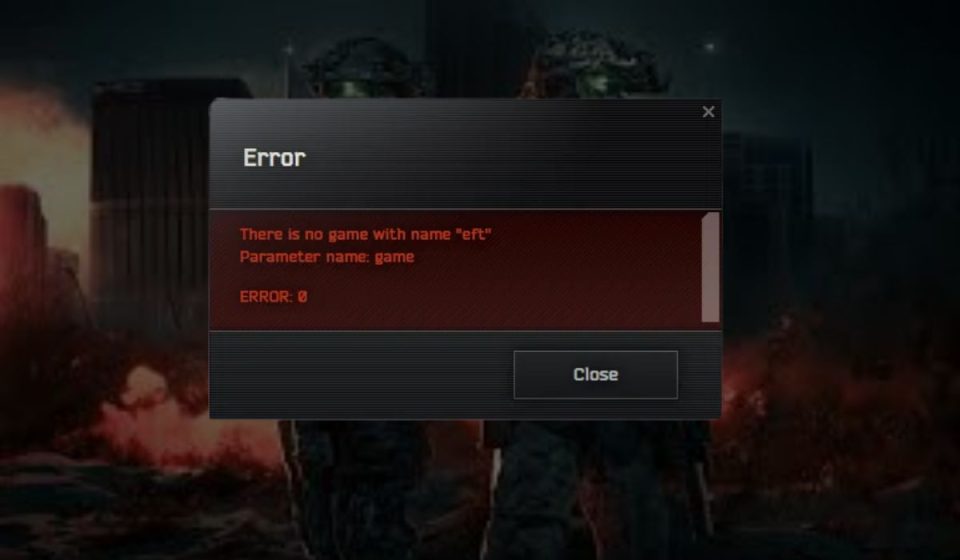
Escape from Tarkov error 0 is a connection or authorization failure. It appears when the game client or launcher cannot complete communication with backend systems. In most cases, the launcher opens, your account loads, but the connection fails before the game fully starts. This often points to a network handshake problem or a failed server response. It does not mean your account is banned, wiped, or flagged.
Players usually see this error during login, right after pressing play, or while the game tries to connect to matchmaking servers. Some see it after a launcher update. Others see it during peak hours. The message stays vague, which makes it harder to understand without context.
Common Causes of Escape from Tarkov Error 0
This error rarely has one single cause. It often happens when several small issues line up at the same time. Sometimes the problem is local. Other times, it comes from the game’s servers. Knowing the common causes helps you judge whether to troubleshoot or simply wait.
Here are the most common reasons linked to error 0:
- Backend server overload or maintenance by Battlestate Games
- Unstable internet connection or packet loss
- VPN or proxy interfering with game traffic
- Firewall or antivirus blocking launcher communication
- Corrupted launcher cache or temporary files
- Outdated game launcher or client files
- DNS resolution problems
- Internet service provider routing issues
Each of these affects how the launcher talks to the game servers. When that conversation fails, the error appears.
How to Fix Escape from Tarkov Error 0?
This error usually clears once the launcher, network, or system refreshes correctly. Sometimes it’s a short server problem. Other times, local settings block the connection. Because the message gives no detail, it’s best to go step by step. Try one fix, then launch the game again. If it still fails, move to the next.
Fix #1: Restart the EFT Launcher
The launcher can get stuck during login or authentication. When that happens, it keeps trying with a broken session.
Close the launcher completely. Make sure it’s not running in the background. Open it again and log in fresh. Many players see the error disappear right after this step.
Fix #2: Check Escape from Tarkov Server Status
Sometimes the issue is not on your side. Battlestate Games servers can slow down or go offline during updates or heavy traffic.
If servers are down or under maintenance, no local fix will work. Waiting is the only option. Once servers stabilize, the game usually connects without changes.
Fix #3: Restart Your Internet Connection
Short connection drops can break the login handshake. Even a brief interruption can trigger error 0.
Here are the following steps which help you to restart your internet connection:
- Turn off your router and modem
- Wait at least 30 seconds
- Turn the modem back on first
- Wait until lights stabilize
- Turn on the router
- Reconnect your PC and try launching the game
A fresh connection often clears routing issues.
Fix #4: Disable VPN or Proxy Services
VPNs and proxies often interfere with game traffic. Tarkov relies on direct server communication, and masked routing can cause failures.
Turn off any VPN or proxy software completely. Restart the launcher after disabling it. Many players report instant success once VPNs are off.
Fix #5: Clear EFT Launcher Cache
Corrupted temporary files can block launcher updates or login requests. Clearing cache forces the launcher to rebuild clean files.
Follow the steps below to easily clear the launcher cache:
- Close the EFT launcher
- Open the launcher folder on your PC
- Locate the cache or temporary files folder
- Delete only cache files, not game data
- Reopen the launcher
- Log in again and test
This does not remove your game or account.
Fix #6: Allow Escape from Tarkov Through Firewall
Firewalls or antivirus software can silently block the launcher. When that happens, the game can’t reach authentication servers.
You can perform the following steps to allow the game through the firewall:
- Open Windows Security settings
- Go to Firewall and network protection
- Allow an app through firewall
- Add the EFT launcher and game executable
- Save changes
- Restart the launcher and try again
This fix is common after updates.
Fix #7: Update the EFT Launcher and Game Client
Older launcher versions may fail to connect after server changes. Updates often fix login and connection issues. Open the launcher and check for updates. If an update is available, install it see it through to the end. Restart your PC after updating, then try launching the game again.
Fix #8: Change DNS Settings
DNS problems can prevent your PC from resolving game servers correctly. Switching DNS can help when your ISP routing is unstable.
Here’s how you can change DNS settings quickly:
- Open Network settings in Windows
- Go to your active network adapter
- Open IPv4 properties
- Set DNS to public DNS servers
- Save changes
- Restart your connection and test the game
This fix often helps during regional routing issues.
How to Prevent Escape from Tarkov Error 0 in the Future?
Prevention won’t stop every login problem, but it helps reduce how often this error appears. Most prevention steps focus on keeping your connection and launcher clean and predictable.
- Use a stable wired internet connection when possible
- Avoid VPNs or proxy tools while playing
- Keep the launcher and game client updated
- Allow the game through firewall and antivirus software
- Restart your router occasionally
- Avoid logging in during heavy traffic hours
- Keep system and network settings simple
Conclusion
To summarize, Escape from Tarkov error 0 is a connection or authorization issue that stops the game from launching or logging in. It often appears due to server load, network instability, launcher issues, or blocked communication. The error looks serious, but in many cases, it’s temporary.
If this article helped you understand what’s going on, share it with another Tarkov player who’s stuck at the launcher.
You can also leave a comment below and mention when the error appears for you. That kind of feedback helps others decide whether to troubleshoot or wait.