
College life gets messy really fast. You have classes and notes and exams all at once. Just one missed date can make your whole week stressful.
Study apps actually help with this. Not every app fixes every problem. But the right one makes studying way less random.
Some apps help you take notes. Others help with flashcards. A few just stop you from looking at your phone. This guide covers the 7 best study apps for college students. It also explains what each app is actually good for.
Quick List of the Best Study Apps
Here is the short version if you just want the names.
| App | Best For | Why It Helps |
|---|---|---|
| Notion | Notes and organization | Keeps notes and plans in one place |
| Quizlet | Flashcards and quick review | Good for learning terms and definitions |
| Anki | Long-term memory | Uses spaced repetition for serious revision |
| Forest | Staying focused | Stops you from checking your phone |
| Google Calendar | Schedules and deadlines | Tracks classes and due dates |
| Todoist | Daily tasks | Breaks big assignments into small jobs |
| Grammarly | Essays and writing | Checks spelling and grammar |
You definitely do not need all of them. Most students only need two or three apps. Just pick the ones that fix your main problems.
1. Notion – Best for Notes and Organization
Notion is a great app for students. It puts everything in one place. You can use it for class notes and assignment lists. It also handles weekly study schedules.
The best part is how flexible it is. You can create a page for every single subject. You can also make tables for your deadlines.
But there is a catch. Notion gets confusing if you try to make it look perfect. Many students waste hours designing pages instead of studying.
So just start simple. Make one basic page for each class. Add your notes and useful links there. That is definitely enough for a beginner.
Notion is best for:
- Class notes
- Assignment tracking
- Reading lists
- Student dashboards
- Group project planning
Notion helps a lot if your notes are always scattered everywhere.
2. Quizlet – Best for Flashcards and Quick Practice
Quizlet is perfect for remembering terms and formulas. It is very useful right before small quizzes.
You can make your own flashcards. Or you can study from sets made by other people. That saves time. But you still need to check those public cards for mistakes.
It works really well for biology and history. Any subject with tons of small facts fits perfectly here.
The best thing is it makes studying feel lighter. You can review cards for ten minutes between classes. Those small review sessions really add up over time.
Quizlet is best for:
- Flashcards
- Quick revision
- Practice tests
- Memorizing terms
- Studying before quizzes
Quizlet is a very solid choice if you want something fast and easy.
3. Anki – Best for Long-Term Memory
Anki is definitely not a pretty app. But it is amazing if you need to remember things for months.
It uses something called spaced repetition. This means it shows you a card right before you forget it. Easy cards show up less. Hard cards show up a lot more.
Medical and law students love Anki. It handles massive amounts of heavy information easily.
It does take some time to learn how it works. The app looks very old compared to newer ones. But Anki becomes your strongest tool once you figure it out.
Use Anki when you need to remember facts for final exams. Do not use it just for tomorrow’s quick quiz.
4. Forest – Best for Staying Focused
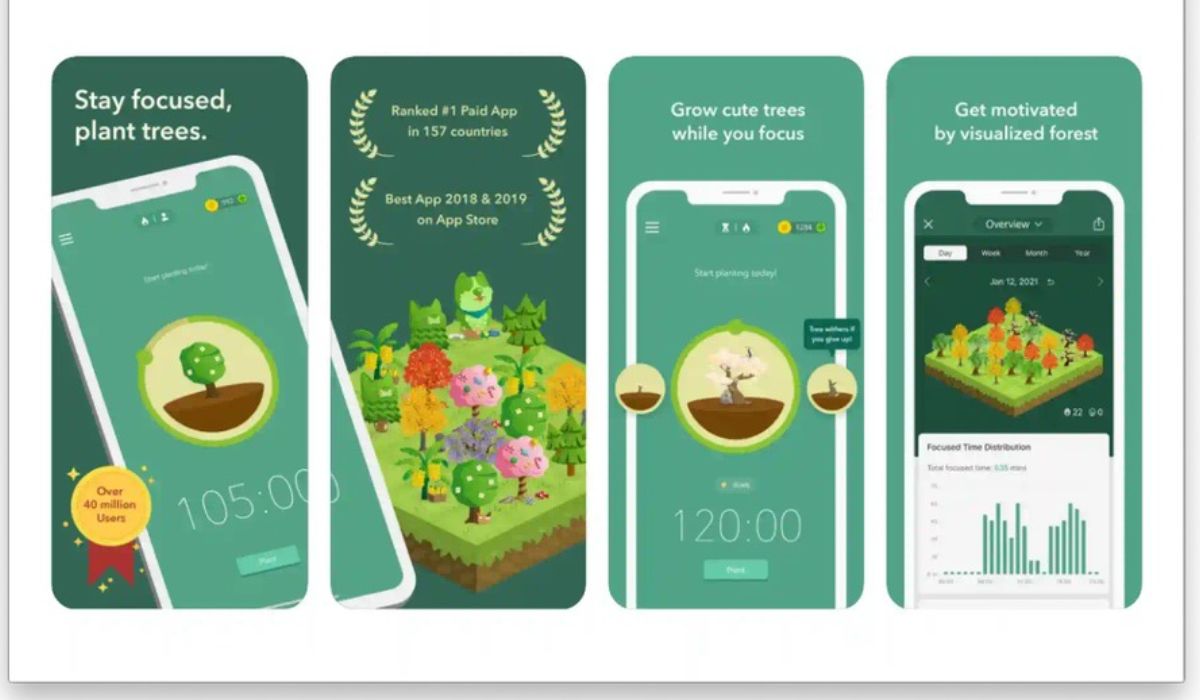
Forest is completely different from note apps. It literally just helps you focus.
The whole idea is very simple. You set a timer and start working. A virtual tree grows while you stay focused. The tree dies if you leave the app to check something else.
It sounds a bit silly. But it actually works for a lot of students. It turns your focus into a visual thing.
This app is great if your phone keeps distracting you. A quick phone check easily turns into twenty minutes of scrolling. We all know that feeling.
Set the timer for 25 minutes and just work.
Forest is best for:
- Phone distraction
- Pomodoro study sessions
- Deep work
- Exam revision
- Building focus habits
Start with Forest if distraction is your biggest problem right now.
5. Google Calendar – Best for Schedules and Deadlines
Google Calendar might sound really boring. But it genuinely saves you from massive stress.
College students miss deadlines for one reason. They think they will just remember everything. Then they get busy and completely forget a date.
This app puts your classes and deadlines in one clear schedule. You can set up reminders too. That is super helpful when a due date is close.
Add every important date at the start of your semester. Put in your exam dates and project deadlines right away.
Then add actual study blocks. This makes your whole week feel planned and calm.
Google Calendar is best for:
- Class schedules
- Exam dates
- Assignment deadlines
- Study blocks
- Reminders
Use a calendar if deadlines always seem to surprise you.
6. Todoist – Best for Daily Tasks
Todoist is a very simple to-do list app. It helps break your big college projects into small tasks.
Writing a full essay feels too big. It makes you procrastinate. But choosing a topic and finding sources feels much easier to start.
That is exactly where Todoist comes in. You can create small tasks for every subject. You can also set a due date for each small step.
It is great for students who know what to do but forget the small details. That happens constantly in college.
Todoist is best for:
- Daily study tasks
- Assignment planning
- Breaking big work into steps
- Homework reminders
- Weekly task lists
Todoist is perfect if you just struggle to stay on top of daily tasks.
7. Grammarly – Best for Essays and Writing
Grammarly is amazing for students who write a lot of essays and emails. It checks your spelling and grammar fast.
It obviously does not replace actual thinking. You still have to understand your topic completely. You also need to read your own work before submitting it.
But it catches those silly mistakes you miss when you are tired. It makes messy sentences look a lot clearer.
Use it at the very end of your writing process. Write the messy draft first. Then run it through Grammarly.
Do not accept every single suggestion though. Sometimes your original sentence is actually better.
Grammarly is best for:
- Essays
- Reports
- Grammar checks
- Spelling mistakes
- Clearer writing
This app helps clean things up if writing is hard for you.
How to Choose the Right Study App
Do not download every single app on this list today. That just creates more mess.
Always start with your biggest problem first.
Try Notion if your notes are totally disorganized. Use Quizlet or Anki if you forget facts fast. Try Forest if your phone is the problem.
Use Google Calendar for missed deadlines. Try Todoist if your assignments feel too huge to start.
Grammarly handles the writing side. It helps a lot when you are tired.
A simple setup looks exactly like this:
- Google Calendar for deadlines
- Notion for notes
- Quizlet or Anki for revision
- Forest for focus
That is plenty for almost anyone. You can always add more tools later.
Common Mistakes Students Make With Apps
The biggest mistake is simply downloading too many apps. It feels productive at first. But then you waste hours setting them up instead of studying.
Making things too pretty is another huge trap. This happens constantly with Notion. A pretty page is completely useless if you never look at it.
Students also create flashcards way too late. Making them the night before an exam barely helps. They work best when you review them over a few weeks.
Avoid these common mistakes:
- Using too many apps at once
- Spending hours setting up dashboards
- Ignoring your reminders
- Making flashcards too late
- Writing tasks that are too big
- Checking the app more than studying
An app should support your routine. It should never become the whole routine.
Final Thoughts
The best study apps are the ones that actually fix your real problems. Notion handles your notes. Quizlet and Anki handle your memory.
Forest fixes your focus issues. Calendar and Todoist handle all the planning. Grammarly simply cleans up your writing.
No app fixes bad study habits by itself. You still have to show up and do the hard work. But good tools make that work much easier to manage.
Start with just one or two apps. Test them out for a few weeks. Keep what works and delete what does not.