


Brand name normalization means cleaning brand names so the same brand appears in one clear way everywhere.
Simple example. You may have Nike, NIKE, Nike Inc, Nike Official and nike in your data. A person can understand they are talking about the same brand. But a website, product feed, CRM or report may treat them as different brands.
This is where brand name normalization helps. It keeps names consistent, easier to search and easier to manage. If you are cleaning product data, ecommerce listings, SEO data or customer records, these rules can save a lot of small headaches later.
What Is Brand Name Normalization?
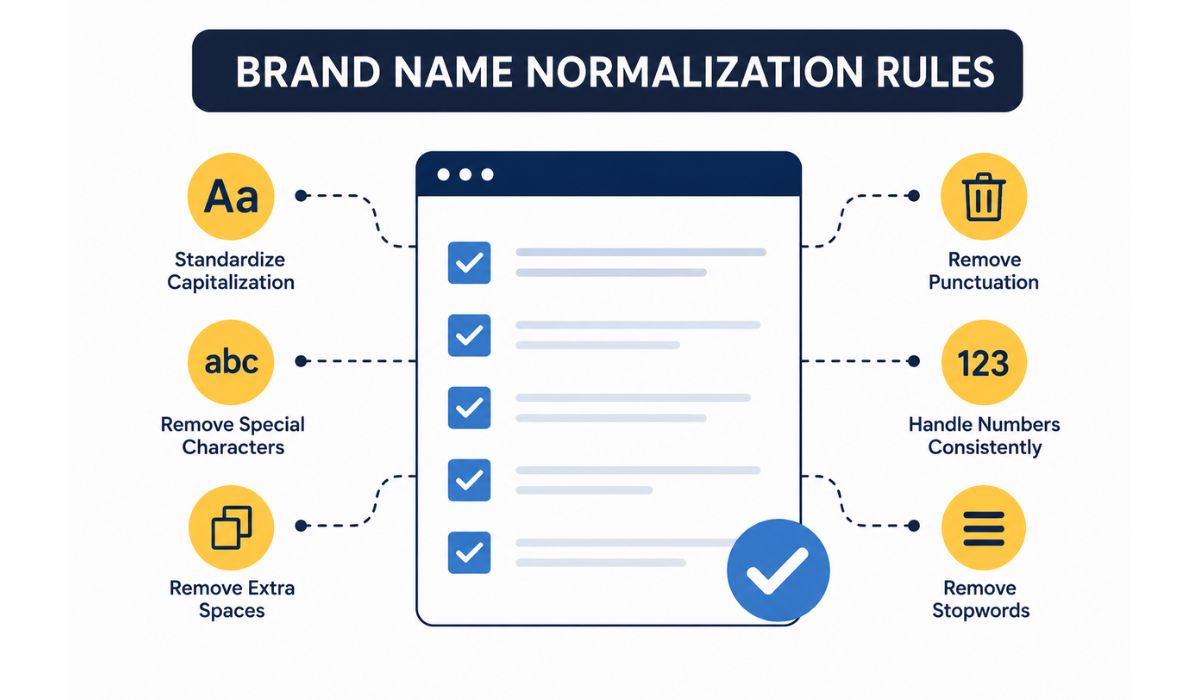

Brand name normalization is the process of choosing one clean version of a brand name and using it everywhere.
It does not mean changing the brand into something fake. It just means you decide the standard version. For example, if your store wants to show Apple as the brand name, then every version like “apple,” “APPLE INC,” “Apple Official” or “Apple Store” should be cleaned to Apple, if they are talking about the same brand.
The main goal is consistency. Same brand, same name. That’s it.
Why Brand Name Normalization Matters
Messy brand names can create problems in many places. At first it looks small, but when you have hundreds or thousands of products, it becomes a real issue.
For example, your ecommerce filter may show:
- Samsung
- samsung
- Samsung Electronics
- SAMSUNG Official
- Samsung Ltd
To the customer, this looks confusing. To your reporting tool, it may look like five different brands. Your product count becomes wrong. Your filter becomes messy. Your SEO pages may also become weak because the brand data is not clean.
Clean brand names help with product filters, search results, reports, product feeds and internal teams. It also makes your catalog look more professional without doing anything fancy.
Use One Official Brand Name
The first rule is simple. Choose one official name for each brand.
If the brand is normally shown as Nike, use Nike. Do not use Nike Inc in some places, NIKE in another place and Nike Official somewhere else. Pick one version and use it across the system.
This matters more in ecommerce. A customer does not usually care about the legal company name. They care about the brand they recognize. So in most product catalogs, the clean public brand name is better than the full legal name.
But there can be exceptions. If you are working with contracts, finance records or legal documents, you may need the full legal name. So do not use the same rule blindly for every system.
Fix Capitalization but Do Not Overdo It
Capitalization is one of the most common problems in brand data. Some names come in all caps. Some come in lowercase. Some have random title case.
A normal cleanup rule can convert messy names into the correct format. For example:
| Raw Brand Name | Normalized Name | Reason |
|---|---|---|
| nike | Nike | Fix lowercase |
| NIKE INC | Nike | Remove suffix and fix case |
| apple official | Apple | Remove the extra word |
| SAMSUNG | Samsung | Use clean brand name |
| The North Face | The North Face | Keep official style |
But be careful. Not every brand should be changed into simple title case.
Some brands use a special style on purpose. For example, H&M should not become “H And M.” A brand with numbers, symbols or acronyms may need to stay as it is. If you force every name into the same format, you may break real brand names.
So yes, fix capitalization. Just don’t over-clean it.
Remove Extra Spaces and Useless Symbols
Many brand names become messy because of extra spaces, strange symbols or copied text from other systems.
You may see names like:
- “ Adidas”
- “Adidas ”
- “Adidas – Official”
- “Adidas®”
- “Adidas Store”
Most of the time, the clean brand should just be Adidas. Extra spaces should be removed. Useless words like “official,” “store,” “seller” or “brand” should also be removed if they are not part of the actual name.
Symbols are a little tricky. Some symbols are noise, but some are part of the brand name. The & in H&M matters. The hyphen in some brand names may matter too. So the rule should not be “remove all symbols.” A better rule is: remove symbols only when they are not part of the real brand name.
Be Careful With Inc, LLC, Ltd and Co
Legal suffixes like Inc, LLC, Ltd, Co and Corporation often appear in brand data. In many product catalogs, you do not need them.
For example:
| Raw Name | Better Display Name |
|---|---|
| Apple Inc. | Apple |
| Samsung Electronics Co Ltd | Samsung |
| Nike, Inc. | Nike |
| Sony Corporation | Sony |
For customer-facing pages, short brand names are usually cleaner. People search for “Sony headphones,” not “Sony Corporation headphones.”
But don’t remove legal suffixes everywhere. If your database is for vendor contracts, invoices or official company records, the legal name may be important. So decide based on the use case.
For ecommerce display, remove them in most cases. For legal or finance records, keep them where needed.
Merge Obvious Duplicate Brand Names
A big part of brand name normalization is merging duplicates. This means you find names that refer to the same brand and consolidate them under a single standard name.
Example:
| Messy Versions | Normalized Brand |
|---|---|
| HP, Hewlett Packard, Hewlett-Packard | HP |
| LG, LG Electronics | LG |
| Apple, Apple Inc, Apple Official | Apple |
| Adidas, adidas, Adidas Store | Adidas |
This makes search and reporting much cleaner. If you do not merge duplicates, your data will keep splitting one brand into many small versions.
Still, manual review is important. Some brand names look similar but are not the same. Do not merge them only because they look close. That can create bigger problems than duplicates.
Do Not Change Stylized Names Too Much
Some brand names are written in a special way. They may have capital letters, lowercase letters, symbols, numbers or spacing that is part of the brand identity.
For example, a brand may use all caps as its public name. Another may include a number in the name. Some use a plus sign, a hyphen, a dot, or an ampersand. If you remove those things without checking, the name can become wrong.
This is where automatic rules can fail. A system may think it is cleaning the name, but really it is damaging it.
The better way is to keep a master brand list. For normal names, rules can work fine. For special names, use the approved spelling from your list.
Create a Master Brand List
A master brand list is one trusted list of clean brand names. It tells your team and your system which version should be used.
This list can include:
- Brand ID
- Clean brand name
- Common misspellings
- Old names or aliases
- Legal name if needed
- Notes for special spelling
This does not need to be too complex in the start. Even a simple spreadsheet is better than nothing. The main idea is to stop people from guessing every time.
If one person writes “The North Face” and another writes “North Face,” your system may split the same brand. A master list avoids that. Everyone follows the same source.
Simple Workflow for Normalizing Brand Names
You can normalize brand names step by step. Do not try to clean everything randomly because that becomes messy fast.
Start by exporting all brand names from your system. Then sort them alphabetically. This helps you see duplicates quickly. You may notice things like lowercase versions, names with Inc, names with extra spaces or names with “official” added at the end.
After that, choose the clean version for each brand. Use the public brand name if the data is for ecommerce or website display. Use the legal name only if your use case needs it.
Then apply your cleanup rules. Remove extra spaces, fix capitalization, remove unwanted suffixes and merge clear duplicates. Keep special names aside for manual review.
After cleaning, test the data. Check your filters, search pages, product feeds and reports. If the same brand still appears twice, go back and fix the rule or add an alias to your master list.
Common Mistakes to Avoid
The biggest mistake is over-normalizing. This happens when you apply one rule to every brand without checking. It may look clean but it can make some names wrong.
Another mistake is merging brands too quickly. Similar names do not always mean the same brand. A small spelling difference can sometimes be a totally different company or product line.
Also avoid adding words that are not part of the brand. Words like “official,” “best,” “store,” “original” and “premium” should not become part of the brand name unless the brand really uses them.
One more thing. Do not clean data once and forget it forever. New messy names will come again from sellers, feeds, forms and imports. Brand name normalization needs review from time to time.
Final Thoughts
Brand name normalization is not about making names fancy. It is about keeping them clean and consistent.
Use one official brand name, fix basic spelling and capitalization, remove useless suffixes and keep a master list for future data. But also be careful with special brand names. Some names should stay exactly how the brand writes them.
If your brand data is clean, your product catalog, reports, filters and SEO pages become easier to manage. Are you cleaning brand names for ecommerce, CRM, SEO or a product feed?