
Use the WordPress Site Editor if you want a lean, native site. Use Elementor if you want faster visual control, more design toys, and less patience for block settings. WordPress introduced full site editing with block themes in WordPress 5.9, so headers, footers, templates, and page parts can now be edited with blocks [source: WordPress].
TLDR: Gutenberg Site Editor is best for simple, fast, future-friendly websites. Elementor is best for people who want drag-and-drop design without fighting the block UI. For example, a small bakery with 8 pages may build a clean site in Gutenberg with fewer plugins, while a design agency building 25 landing pages may save hours with Elementor templates and widgets. If your top goals are speed and low cost, pick Gutenberg; if your top goal is visual polish, pick Elementor.
What Are We Comparing?
Gutenberg Site Editor is built into WordPress. It lets you edit the whole site with blocks. Not just posts. Not just pages. The whole thing.
You can edit:
- Headers
- Footers
- Blog layouts
- Single post templates
- Archive pages
- Global styles
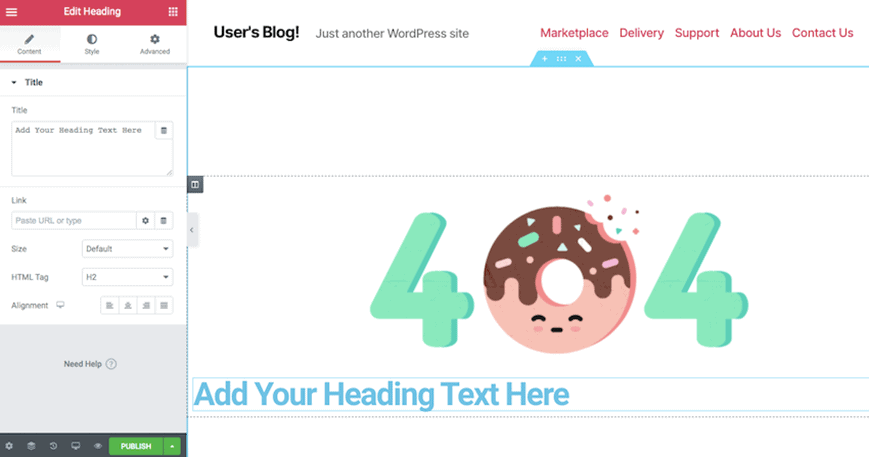
Elementor is a popular page builder plugin. It gives you a visual drag-and-drop editor. You can see the design as you build it. Click. Drag. Style. Repeat.
Elementor can also edit site parts like headers and footers, but many of those features require Elementor Pro.

The Simple Difference
Gutenberg feels like building with official WordPress Lego bricks.
Elementor feels like using a design app inside WordPress.
That is the big split.
Gutenberg Site Editor is more native. It usually means less plugin weight. It plays nicely with modern block themes. It is also improving with each WordPress release.
Elementor is more visual. It has more widgets. It has more design controls. It is easier for many beginners to understand on day one.
The catch is, Elementor can add extra code. That can slow things down if you go wild with effects, sliders, animations, and 14 different sections just to say “Welcome.” We have all seen that site. It loads like it is carrying groceries uphill.
Ease of Use
Elementor wins the first impression contest.
You click an element. You move it. You style it in a side panel. It feels clear. If you want a button bigger, you drag a control. If you want two columns, you add them. Nice.
Gutenberg is cleaner, but not always obvious. Some controls hide in sidebars. Some live in the top bar. Some appear only after you click the right block. Honestly, it feels like WordPress sometimes hides the remote in the couch.
Still, Gutenberg becomes easier once you learn the pattern:
- Pick a block.
- Style the block.
- Group blocks when needed.
- Save sections as patterns.
- Control the site style globally.
Once that clicks, it feels tidy.
Design Freedom
Elementor gives you more visual freedom out of the box.
You get widgets for forms, sliders, tabs, accordions, icons, popups, and fancy sections. You can also adjust spacing, borders, shadows, and responsive settings with a lot of control.
That is great for landing pages. It is great for sales pages. It is great when a client says, “Can you move this button 7 pixels left?” Annoying request. But yes, Elementor can do it.
Gutenberg is more restrained. That is not always bad. Restraint keeps sites clean. It also keeps clients from turning every heading purple with a glow effect.
With a good block theme, Gutenberg can look polished. You can use patterns, style variations, and reusable blocks. But advanced layouts may still feel slower to build.
Speed and Performance
Gutenberg has the edge here.
Because it is part of WordPress core, it often creates lighter pages. A simple block theme can be quick. Fewer plugins also mean fewer update headaches.
Elementor can be fast too. But you need discipline. Use fewer widgets. Avoid heavy animation. Compress images. Use caching. Do not install five Elementor addon packs unless you enjoy plugin roulette.
Expect to waste time on cleanup if the site was built with too many nested sections. One hero area should not need 19 containers. That is not design. That is a storage unit.
Cost
Gutenberg is free. The Site Editor is inside WordPress. You may pay for a premium block theme or block plugin, but you do not have to.
Elementor has a free version. It works well for basic pages. But the serious site-building features often sit in Elementor Pro. That includes theme building, more widgets, forms, popups, and some marketing features.
So the money question is simple:
- Tiny budget? Gutenberg wins.
- Need polished pages fast? Elementor Pro may be worth it.
- Building many client sites? Elementor can save time.
- Maintaining one simple business site? Gutenberg is often enough.
Theme Building
This is where the fight gets interesting.
Gutenberg Site Editor was made for full site editing. It handles templates in a native way. You can edit a single post template, page template, archive template, and more.
Elementor Pro also has theme building. It gives you a visual way to design headers, footers, blog post layouts, and WooCommerce templates.
The difference is mood.
Gutenberg says, “Here is the WordPress way.”
Elementor says, “Here is the designer way.”
Neither is wrong. They just fit different brains.
Content Editing
For blog posts, Gutenberg is usually better.
It is clean. It is quick. Writers can add headings, images, quotes, tables, and buttons without opening a heavy builder. It also keeps content more portable. If you change themes later, your content is less likely to explode into shortcode confetti.
Elementor is better for highly designed pages. Think home pages, campaign pages, product feature pages, and portfolio layouts.
A good setup may use both. Use Gutenberg for posts. Use Elementor for key landing pages. That can work well. Just do not build every tiny blog post in Elementor unless you have a very good reason.
WooCommerce Sites
Elementor is strong for WooCommerce design, especially with Pro. You can style product pages, shop pages, and checkout parts with more visual control.
Gutenberg is catching up. WooCommerce blocks are improving. Block themes are getting better. But Elementor still feels easier when you want custom product layouts fast.
If your store has 10 products, Gutenberg may be fine. If your store has 300 products and needs custom sales pages, Elementor may feel smoother.

Who Should Pick Gutenberg?
Pick Gutenberg Site Editor if you want:
- A faster, lighter site
- Fewer plugins
- A free site-building tool
- Better long-term WordPress fit
- Simple content editing
- Clean blog layouts
It is a smart choice for bloggers, small business sites, personal brands, basic portfolios, and simple service websites.
Who Should Pick Elementor?
Pick Elementor if you want:
- Drag-and-drop design
- More widgets
- Visual spacing controls
- Fast landing page creation
- Client-friendly editing
- Popups and marketing features
It is a strong choice for agencies, marketers, designers, coaches, online stores, and anyone who wants more control without custom code.
The Final Pick
Choose Gutenberg Site Editor for speed, simplicity, and native WordPress power. It is the cleaner long-term bet for many sites.
Choose Elementor for visual design, flexible layouts, and faster page building. It is better when the site needs flair and the budget allows it.
If you still feel stuck, ask one question: Will this site be mostly content, or mostly design?
If it is mostly content, go Gutenberg. If it is mostly design, go Elementor.
Simple. No drama. Well, less drama. It is still WordPress.